Capture calls, referrals, and web inquiries in one intake path so prospects get clear next steps before they lose confidence or call another firm.
Respond Faster
Collect the right details without overwhelming older or cautious clients, then move confirmed facts into consult notes, documents, and follow-up tasks.
Control Intake
Track each matter from consult through draft, review, signing, funding, and closeout so owners see stalled work before clients start asking again.
Move Matters On
Give clients simple updates, reminders, payment links, and next steps while reducing routine calls, inbox follow-up, and attorney interruptions.
Protect Client Trust


Systems Customized to Meet Your Needs
Our systems are developed around the way legal inquiries, client intake, document preparation, signatures, and follow-up actually move:
Marketing & Visibility - Clarify practice areas, referral paths, review signals, consultation booking, and simple next-step messaging.
Lead Capture & Intake - Capture calls, forms, referrals, basic family details, urgency, conflicts, and consultation readiness.
Quote & Approval Flow - Manage consultation outcomes, engagement letters, flat fees, deposits, scope decisions, signatures, and payment status.
Scheduling & Calendar Control - Organize consults, attorney review time, signing appointments, filing tasks, and follow-up dates.
Matter Workflow - Give attorneys and staff matter stages, task owners, draft checklists, review steps, and closeout requirements.
Customer Communication - Send consult confirmations, document reminders, draft-review updates, signing instructions, invoices, and plan-review prompts.
Service History & Retention - Track clients, matters, documents, funding tasks, review dates, referrals, and future planning opportunities.
Reviews & Reporting - Track inquiry response, consult conversion, matter status, document turnaround, payments, referrals, reviews, and workload.
Top Ten Points of Failure for Estate Planning and Small Law Firm Systems
1. Slow response to new inquiries
Owners say the first breakdown happens before a consultation is booked. Missed calls, slow email replies, and unclear next steps cause prospects to lose confidence or contact another attorney before the firm can show its value.
2. Website and referral trust gaps
Prospects often check the firm online after a referral. When reviews, process explanations, price expectations, practice focus, and consultation steps are hard to understand, the referral loses strength before intake begins.
3. Intake that overwhelms clients
Attorneys report that older or less tech-comfortable clients can disappear when intake starts with long portals, dense PDFs, or too many sensitive questions. The better fit is simple intake that gathers enough detail without creating fear or delay.
4. Manual reentry from consult to documents
Small-firm lawyers describe taking notes, writing summaries, moving facts into templates, printing packets, copying documents, and assembling binders by hand. Repeated manual entry slows the matter and increases error risk.
5. No centralized matter visibility
Managers indicate that matter information often lives across paper files, inboxes, notes, attorney memory, and disconnected tools. Without one shared record, staff struggle to see what is waiting, who owns it, and what comes next.
6. Unclear task ownership and handoffs
Estate-planning work depends on intake follow-up, drafting, review, signing prep, funding tasks, client delivery, and later check-ins. When ownership is informal, stalled work stays invisible until the client asks for an update.
7. Drafting, review, and signing bottlenecks
Attorneys want faster document production, but generic automation can create long packets, buggy questionnaires, or outputs that do not fit the firm's service style. Poorly fitted tools add friction instead of removing it.
8. Client communication gaps during the matter
Clients often judge the firm by reassurance, responsiveness, and clarity. When status updates, document reminders, signing instructions, and feedback requests are inconsistent, the firm creates avoidable anxiety and calls.
9. Payment, engagement, and collection friction
Flat-fee work still slows down when engagement letters, deposits, signatures, balances, and payment links are split across email, PDFs, checks, and bookkeeping tools. Firms need payment steps tied to the matter workflow.
10. Weak post-signing and review follow-up
Completed plans can go quiet after signing. Trust funding reminders, annual reviews, document updates, client feedback, reviews, and referrals often depend on memory instead of a built-in follow-up rhythm.
Here's How We Address These Issues

Client-Friendly Intake
-
Captures caller, referral, practice need, urgency, conflicts, and consultation readiness
-
Keeps intake simple enough for older or cautious clients to complete without friction
-
Separates estate planning, probate, trust administration, and boutique legal requests
-
Moves confirmed facts into consult notes, matter records, and document checklists
-
Reduces missed leads, duplicate entry, and unclear next steps before the consultation

Matter Visibility
-
Centralizes matter stages, task owners, due dates, notes, and required documents
-
Shows what is waiting on client information, attorney review, signing, or payment
-
Connects consult outcomes, document drafts, revisions, signatures, and closeout tasks
-
Reduces dependence on paper files, inbox chains, sticky notes, and individual memory
-
Gives owners clearer status without asking staff for an update on every matter

Document Workflow
-
Gives attorneys and staff simple steps for each document-heavy matter type
-
Tracks intake facts, draft preparation, attorney review, client edits, and signing prep
-
Standardizes checklists for trust packages, wills, powers, deeds, and funding tasks
-
Builds QA into the work before documents go to clients or into signing packets
-
Helps reduce rework, missed attachments, unclear instructions, and signing delays

Engagement and Payment Control
-
Tracks engagement letters, scope decisions, flat fees, deposits, and payment links
-
Shows which matters are waiting on signature, deposit, balance, or internal approval
-
Documents what the client accepted before work moves into drafting or revision
-
Helps reduce collection friction, scope confusion, and billing follow-up
-
Protects margin while giving clients a clearer, calmer process

Review and Follow-Up Rhythm
-
Stores client, family, document, asset, funding, and matter history in one record
-
Triggers reminders for trust funding, plan reviews, document updates, and annual check-ins
-
Supports review requests and referral prompts after successful closeout
-
Helps convert completed plans into long-term client relationships
-
Keeps follow-up from disappearing when the attorney or key staff member gets busy

Referral and Reputation Backbone
-
Connects referrals, website inquiries, reviews, consultation booking, and follow-up
-
Tracks source, conversion, consult outcome, matter value, and client sentiment
-
Keeps tools practical, secure-minded, and fitted to how small firms actually work
-
Gives firm leaders better visibility into marketing, workload, and revenue quality
-
Creates a practice foundation that can support more matters without more chaos

Matter Status View
Matter-stage visibility from new inquiry through consultation, drafting, review, signing, funding, and closeout. Teams can see status, owner, missing items, next action, and client update needs without chasing separate threads.

Document & Signing View
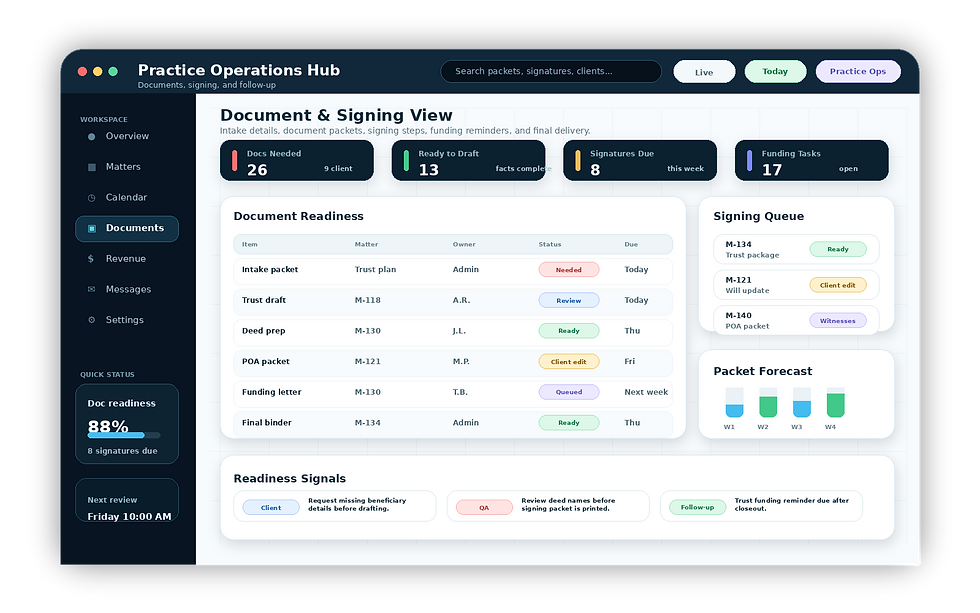
A control view for intake details, document checklists, draft review, client edits, signing packets, e-signature or wet-signature steps, funding reminders, and final delivery.
Revenue & Referral Intelligence
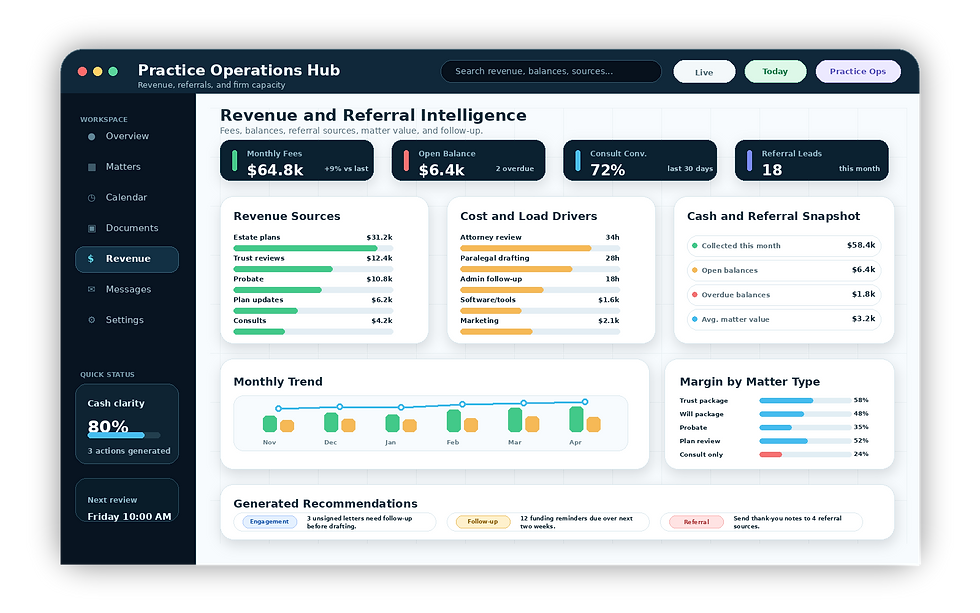
Consultation, engagement, payment, matter value, referral source, review, and follow-up visibility for firm owners. The view shows stalled engagements, unsigned packets, unpaid balances, and practical next actions.